Meet Companions in Stills: Little Friends for Your Video Slider
Meet Ginger Cat, Lion Cub, Tiger Cub, Husky Puppy, and Parrot. The new Companions in Stills bring a little personality to finding your favourite video frame.
Written by Maulik Sutariya

I have always believed that useful software can be simple, creative, and fun at the same time. Sometimes a small detail makes an everyday task feel a little more personal. That is the idea behind Companions in Stills.
Stills helps you find a moment in a video and save it as a photo. Now, a little pixel-art animal can keep you company while you move through the frames. It follows your slider, reacts to a greeting, and brings a small spark of personality to the experience.
Stills with Companions is available on the App Store for iPhone, iPad, and Mac. I would love to introduce you to the first five little friends.
A Little Companion for Your Video Slider
The frame-selection slider is where you spend time finding the moment you want to keep. A smile, a jump, a bird taking flight, or a wave breaking can look different from one frame to the next.
Companions sit just above that slider. As you move through your video, your chosen animal follows along. The Parrot flies after the handle, while the four-legged companions move across the timeline in their own way. When things become quiet, they can settle down and rest.
You can also tap a companion on iPhone or iPad, or click it on Mac, for a little greeting. These small movements give the controls some character while you continue choosing your frame.
Your saved photo remains the video frame you selected. The companion belongs to the experience of finding that moment.
Meet the Five Stills Companions
The first collection includes five animals, each with its own pixel-art appearance and animations:
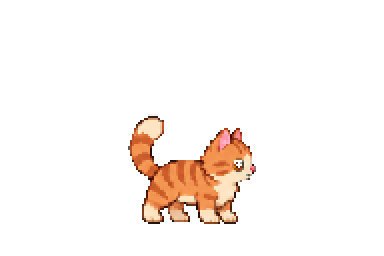
- Ginger Cat has warm orange stripes, a white muzzle, and an upright curled tail.
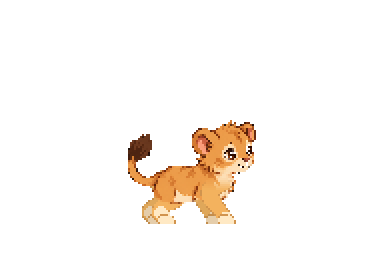
- Lion Cub brings golden colours, round ears, and a brown-tipped tail.
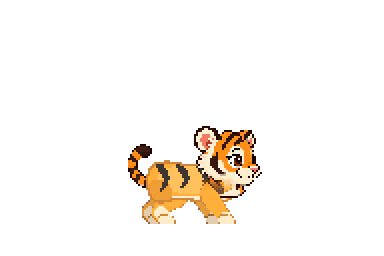
- Tiger Cub has bold black stripes and a friendly little face.
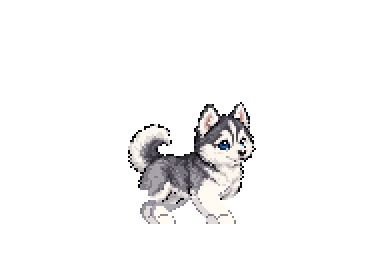
- Husky Puppy pairs a silver-and-white coat with bright blue eyes.
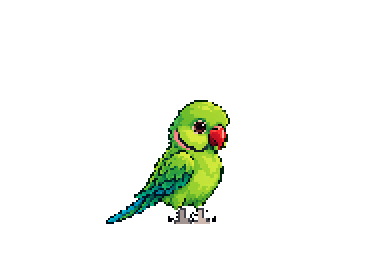
- Parrot adds a splash of green, a red beak, and a long blue tail.
The images above are the original companion artwork used by the app. In Stills, the animals are small enough to sit comfortably above the slider, with their movements bringing them to life as you interact with the controls.
How to Choose a Companion in Stills
Choosing your companion takes just a few steps:
- Open Settings in Stills.
- Find the Companions section and choose Choose Companion.
- Browse the gallery and select your favourite companion.
- Return to your video and move the slider to see your companion follow along.
You can browse the collection and try the interactive Parrot preview in the gallery.
If you prefer a quieter workspace, choose None in the gallery. You can change your companion whenever you like, so the app can feel the way you want it to feel.
Find Your Frame on iPhone, iPad, or Mac
Companions are part of Stills across Apple’s iPhone, iPad, and Mac platforms. On iPhone and iPad, you move through your video with touch. On Mac, you can use the slider with your pointer and greet your companion with a click.
The main workflow stays familiar: import a video, find your favourite frame, and save it as a photo. If you are new to the app, my guide to saving a photo from a video on iPhone, iPad, and Mac walks through that process and the enhancement and export options.
You can also visit the Stills app page for an overview of its video-to-photo features and supported Apple platforms.
Small Details That Make Software Feel Personal
When I work on Stills, I think about both the useful task and the experience around it. Finding the right frame should feel comfortable, and personal touches should be easy to choose.
Companions build on the ways you can already make Stills your own, including slider styles, accent colours, and app icon choices. You might choose a Ginger Cat today, a Parrot tomorrow, or keep the slider on its own. The choice is yours.
This is the same belief I shared in Technology Should Give Us Time Back: technology should help us, leave room for creativity, and be enjoyable to use.
I hope these little companions bring a smile while you find a moment worth keeping. Thank you for using Stills and supporting the work that goes into it.